Naraka Bladepoint is a fast-paced action game with a melee combat system that takes place in a feudal Chinese setting. With 60 players fighting for survival, there’s no room for mistakes. To avoid losing unnecessarily, you’ll need to be at your best at all times. One way to achieve this is by configuring the game settings to provide the best possible gaming experience.
In this guide, we’ll be sharing the best settings for Naraka Bladepoint to help you optimize your gameplay. By following our recommendations, you’ll ensure a more stable and consistent game performance, which will give you an edge in battle. You’ll never lose frames or experience lag, allowing you to focus entirely on your gameplay and emerge victorious in every battle. So, read on to discover the best settings for Naraka Bladepoint and elevate your gaming experience to the next level.
Best PC Settings For Naraka Bladepoint: High FPS
The settings described below assume that you’re running the game on an adequate machine that meets the minimum requirements to run Naraka Bladepoint. If your rig is a bit beefier, then feel free to push some of the settings up as they demand more resources and can make use of more powerful graphics cards and processors.
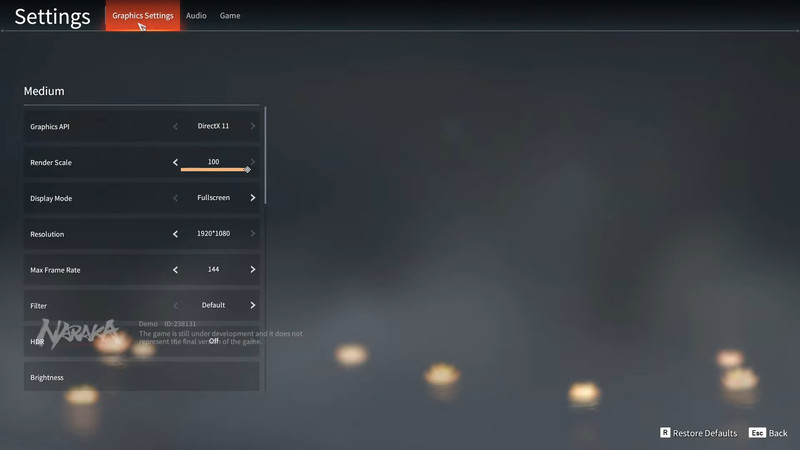
But to appeal to all our readers, here are the general settings for getting the best FPS in Naraka Bladepoint for any PC meeting the minimum requirements to run the game at the base. These settings will have the game looking decent and, most importantly, running as smoothly as possible to give you the best performance in the game.
| Graphic Options | Settings |
| Graphics API | DirectX 11 |
| Render Scale | 100 |
| Display Mode | Fullscreen (Native) |
| Resolution | 19020×1080 (OR Native) |
| Max Framerate | 120 (Or the Native Refresh rate of the monitor) |
| HDR | Off |
| Filter | Default |
| Vsync | Off |
| Antialiasing Algorithm | Off |
| Motion Blur | Off |
| Checkboard Rendering | Off |
| NVIDIA DLSS | Off |
| NVIDIA Reflex | Off |
| NVIDIA Highlights | Off |
| Modeling Accuracy | Medium |
| Tessellation | High |
| Effects | Low |
| Textures | High |
| Shadows | Lowest |
| Volumetric Lighting | Low |
| Volumetric Clouds | Off |
| Ambient Occlusion | Off |
| Screen Space Reflections | Off |
| Anti-aliasing | Low |
| Post-processing | Lowest |
Remember that the best settings for Naraka Bladepoint depend on your personal preferences and hardware capabilities, so take the time to experiment and find the settings that work best for you. But overall, the settings described above are the best for getting the max performance out of Naraka Bladepoint, even for machines running the game with minimum requirements.