
How To Use No Man’s Sky Save Editor
No Man’s Sky save editor is a tool that allows players to modify certain data values in their saved game files. The editor can change currencies such as Units, Nanites, and Quicksilver, as well as base stats for Exosuits, Multitools, Ships, and Freighters, including health, shield, type, class, seed, and more.
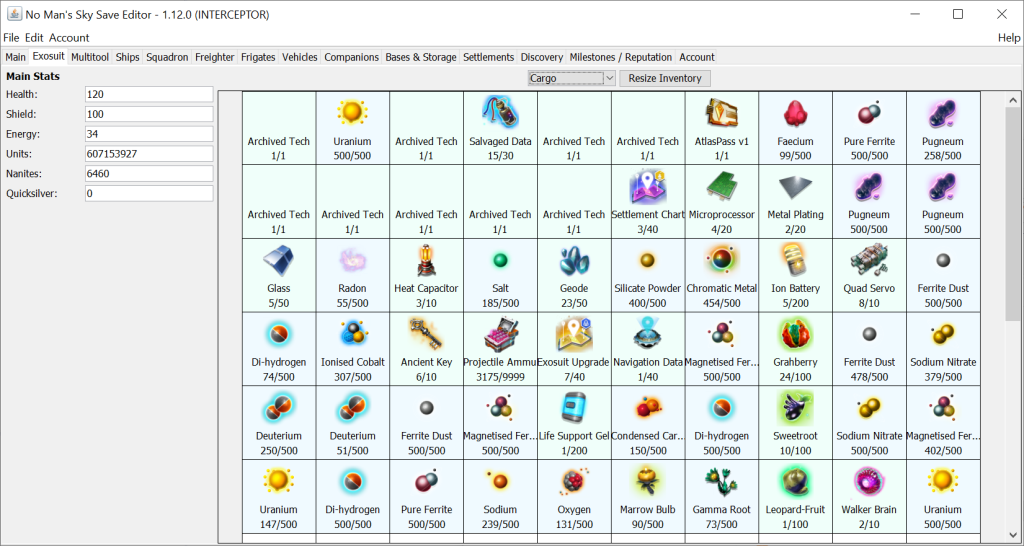
The save editor also lets players manage their inventories, such as exosuit, multitools, ships, freighters, vehicles, and base storages, by moving, cloning, adding, or deleting items and technology. They can also resize inventories, enable or disable additional slots, view more information about each item, repair, recharge, and refill items, and more.
Here’s how to install it in your system:- First, download the program, which is available for free.
- Extract the zip file’s contents by running the exe into a new and empty folder.
- Launch the bat file (or the jar file if it is associated with Java) to open the main window.
- Once the main window appears, find the folder where your saved files are stored and select the latest one.
If you are using a PS4, you will need to have Save Wizard installed. Finally, you will need to have Java Runtime Environment 8 installed on your computer. These three components are required to run the No Man’s Sky save editor and make changes to your game save file.
Will You Get Banned for Using the Save Editor
In a word, no. You will not get banned for using a save editor in No Man’s Sky, so go ahead.