FPS plays a crucial role while playing video games, and the latest battle royale title, Warzone 2, is no exception. A high number of frames per second, or FPS, is pretty important as it delivers a smoother gameplay experience while you’re playing Warzone 2.
However, before you start improving your framerate, you need to know what FPS you’re running Warzone 2 at. With that said, we take a look at how you can show framerate count, which is disabled by default in Warzone 2.
How to Enable FPS Count in Warzone 2
Following are the methods through which you can show or display FPS in Call of Duty: Warzone 2:
Turn on the FPS Counter From In-Game Settings
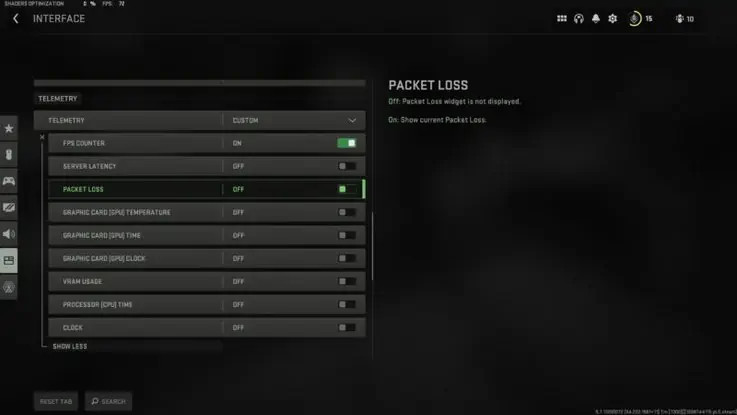
Follow these steps to turn on the FPS Counter from Call of Duty Warzone 2 in-game settings:
- Launch the Warzone 2 game.
- Click on the Settings option in the Top Right Corner of the screen
- From the list, select “Interface.”
- Find the “Telemetry Settings” option and set it to custom.
- Click on the See more option.
- Scroll down to find the FPS Counter option.
- Toggle it on, and the FPS meter shows up on the top left of the screen.
Use Steam Client to Display FPS Counter
- Open Steam.
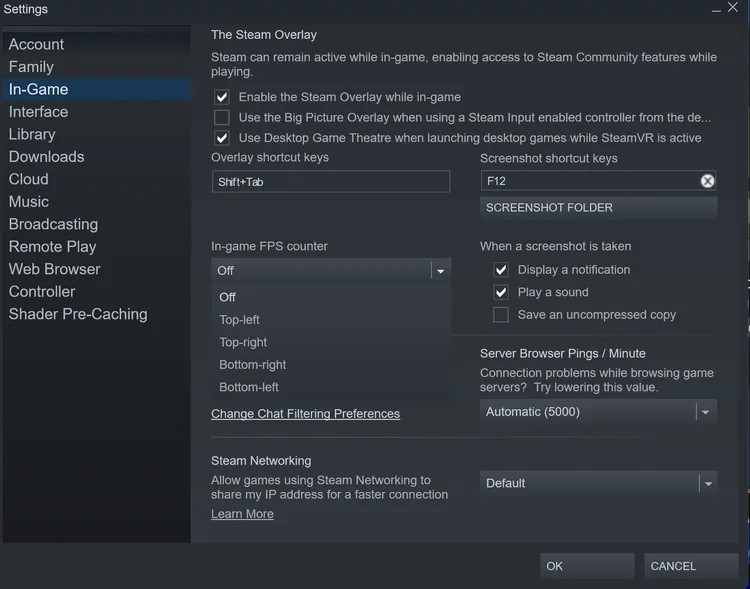
- Go to Steam > Settings > In-Game.
- Under In-game FPS counter, select the corner where you’d like the counter to appear.
- You can also check the High contrast colors if you prefer.
- Click Ok.
Apart from this, one can also use third-party software like MSI Afterburner, NZXT Cam, or FPS count to display FPS in video games, including Warzone 2.
For more Call of Duty news, be sure to check out our dedicated section or some of our Warzone 2.0 and Modern Warfare 2 Guides & Tutorials below:
Warzone 2.0 Guides – Map Al Mazrah Guide|Map Size|All Killstreaks Explained|Unlock All Operators|New Reporting System|Prestige Ranks, Cap, Rewards|New Battle Pass System|All New Operators List|Victus XMR Sniper Rifle Unlocking Guide|Backpack & Looting Explained
Modern Warfare 2 Guides – Jack Links Skin| Unlock All Operators| Check Server Status| Get Twitch Drops| Post-Credit Scene Explained| Unlock Gold Camo| Get Burger Town Operator| MGB Nuke| Unlock Every Weapon| All Killstreaks| Safe Code Locations|Check KD Ratio|XP Farm Trick|Chopper Gun Glitch|Weapon Tuning|Change Name Color|Hardcore Tier 1 Mode| Turn Off Crossplay|Steam Deck|
Featured image courtesy of Activision.