If you’re wondering how to remove chat notifications in Diablo 4, you’re in the right place. The co-op mode can be a great way to team up with friends or strangers to conquer dungeons together. However, it can also be very distracting or annoying for some Diablo 4 players who might not appreciate seeing chat messages spammed on the screen.
This is especially true while they’re trying to immerse themselves in the game world. But fear not! That’s where knowing how to turn off chat in Diablo 4 comes in handy. In this guide, we’ll walk you through the simple steps you need to take to hide chat in Diablo 4, so you can focus on the game and enjoy the immersive experience without any distractions.
How To Disable Chat In Diablo 4: Toggle Chat On/Off
While it’s not possible to disable all messages in Diablo 4, you can turn off specific chat notifications that may be distracting or unwanted. These include Local, Trade, Party, and Clan chat. The good news is that turning them off is incredibly easy!
All you need to do is access the “Options” menu by pressing the ESC key and then go to the “Social” tab. From there, scroll down to the Chat section and uncheck the “Join Local Chat Channel” and “Join Trade Chat Channel” boxes. This will prevent players from engaging with you in those specific chat channels.
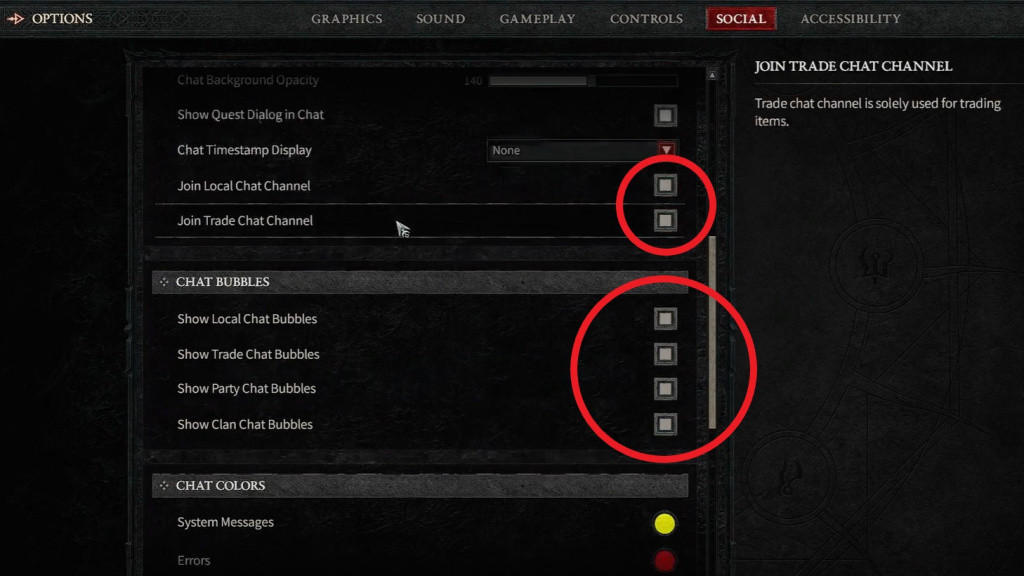
If you want to enable them again, just check the boxes. Additionally, you can disable individual chat notifications for Local Chat, Trade Chat, Party Chat, and Clan Chat in the same options menu. So, with just a few clicks, you can customize your chat experience in Diablo 4 to your liking. And that’s everything you need to know about how to disable chat in Diablo 4.
It’s a quick and straightforward process that will enhance your gameplay experience by removing unnecessary distractions. While you’re here, don’t forget to check out our other guides, like how to reach max level fast or the location of the world boss Ashava in Diablo 4, as well as solutions to side quests like Raising Spirits and Secret of the Spring. Happy gaming!